
 Log In× Close


April 3, 2026
We have been alerted to a new type of phishing attack targeting consumers which involves attackers sending fake calendar invites to users' email accounts. These attacks take advantage of Google's default settings that automatically add invitations to your email calendar.
This phishing technique uses Google Calendar invitations to deliver scams directly to your calendar. Because Google automatically adds calendar invites by default, attackers can make these events appear genuine, showing them alongside your real meetings.
Common examples of fake calendar events include:
Here is an example:
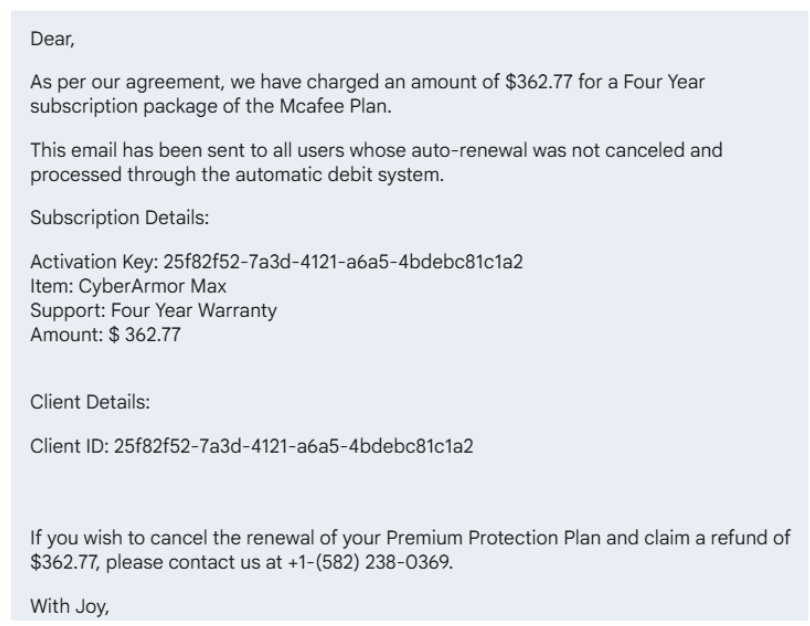
Attackers exploit Google’s default setting that automatically adds new calendar invitations to your schedule. When a user receives an invite, even from an unknown sender the event appears in their calendar, often with an urgent message in the description.
These descriptions can contain:
Once a user clicks a link or calls the number, the attacker can try to steal login credentials, financial information, or remote access to the computer.
Attackers disguise their phishing lure as a harmless calendar event to get your attention. The attacker’s goal is to get you to contact them, where the real attack occurs. They will attempt to extract credit card details or login information if you call the phone number or click any links.
By exploiting a familiar platform you use daily and naturally consider safe, such as Google Calendar to take advantage of the false sense of security you may feel when using it.
Watch for these red flags in suspicious calendar invitations:
Some people put in higher levels of protection by limiting who can add events to your Google Calendar. To do this, follow these steps:
However, there are downsides to creating this level of protection. While limiting who can automatically add events to your calendar helps protect against phishing scams, it may also change how legitimate invitations behave.
For some, the benefits outweigh the drawbacks for most users, especially given the rise of calendar-based phishing attacks, but it’s important to understand that you’re trading a bit of convenience for added protection.
If you frequently collaborate with external partners, you can balance security and usability by choosing “Only if the sender is known” (rather than the stricter “When I respond”) and staying vigilant when reviewing event emails.
 Log into Online Banking